Thursday, April 11, 2013

1.0.0.62: What's new?

To get the latest version, run "Check for updates" from the Device Center or download.

New: Added simple GPS sample showing how to query the current location.

This sample shows the use of the GPS based location service. Read more.

New: Added support for specifying the target SDK version.

[do not use property TargetSdkVersion of PackageAttribute - this property will be replaced by a Project property in the next update]

The minimum Android version supported by your application is determined by the "Android version" specified in your dot42 project (see project properties - Android tab).

We have added a new property called TargetSdkVersion to the Package attribute. With this property you can specify the target SDK version of your application. This the maximum Android version for which forward-compatibility will be enabled. This property is typically used to enable the Android Holo theme when your app runs on a modern device. The app will still run on the minimum Android version.

This property corresponds to the android:targetSdkVersion attribute of the uses-sdk element in the Android manifest file.

You can use this property as follows:
[assembly: Package(TargetSdkVersion = "v4.0.3")]

Change: Reachable detection phase of the compiler has changed.

The dot42 compiler includes the minimum number of types and members that are required to have a working application. These types and member are identified during the reachable detection phase. This phase has changed. Before all public types were included. In this release only those types that are marked with an ApplicationRoot attribute (or derived attribute such as Activity) are included.

Fixed: Rare verify error

The major compiler redesign of 1.0.0.61 introduced a verify error in rare cases involving calling methods. This has been fixed.

A GPS Client

This article walks through a basic dot42 code sample that uses the location services such as GPS on an Android device. While this article includes code snippets only, the full code sample is included in dot42 update 1.0.0.62 or higher. See folder [MyDocuments]\dot42\Samples\Sensors\SimpleGps.

Declare permissions

An application that uses location services requires certain permissions. You need INTERNET and ACCESS_COARSE_LOCATION to access the network-based location provider only. For more accurate GPS you need ACCESS_FINE_LOCATION permission. Declaring ACCESS_FINE_LOCATION implies ACCESS_COARSE_LOCATION.
Traditional Android developing declares permissions in AndroidManifest.xml as follows:
<manifest xmlns:android="http://schemas.android.com/apk/res/android">
  ...
  <uses-permission android:name="android.permission.ACCESS_COARSE_LOCATION" />
  <uses-permission android:name="android.permission.INTERNET" />
  ...
</manifest>
However, using dot42 you declare the same set of permissions using the assembly attribute UsesPermission as follows:
[assembly: UsesPermission(Android.Manifest.Permission.ACCESS_COARSE_LOCATION)]
[assembly: UsesPermission(Android.Manifest.Permission.INTERNET)]

LocationManager

Class LocationManager is the starting point for accessing location services. You retrieve an instance as follows:
LocationManager service =
  (LocationManager) GetSystemService(LOCATION_SERVICE);
The next step is to check whether GPS has been enabled on the device:
bool enabled =
  service.IsProviderEnabled(LocationManager.GPS_PROVIDER);
On my Asus Transformer Pad, this corresponds to the following setting:


If GPS is not enabled you may choose to fall back to the network-based location provider. You would check availability as follows:
bool enabled =
  service.IsProviderEnabled(LocationManager.NETWORK_PROVIDER);

Get location provider

After we have determined what provider is enabled, we can retrieve it and ask for the location. Assuming that GPS has been enabled, we would retrieve the provider and location as follows:
// get the provider
Criteria criteria = new Criteria();
criteria.Accuracy = Criteria.ACCURACY_FINE;
provider = service.GetBestProvider(criteria, false);
// request the location (returns null if provider is disabled)
Location location = service.GetLastKnownLocation(provider);
If GPS is not enabled, you may request a provider with course accuracy like this:
criteria.Accuracy = Criteria.ACCURACY_COARSE;

Receive location updates

The above code requests the last known location. The current location may however change and we would like to be notified when it does. This can be done by registering a listener. You typically do this in the OnResume of your activity:
protected override void OnResume()
{
  base.OnResume();
  if (enabled) service.RequestLocationUpdates(
    provider, // as returned by GetBestProvider
    1000, // minimum update period in ms
    1, // minimum update distance in m
    this);
}
In the Activity overridable OnPause, you would remove your listener as follows:
protected override void OnPause()
{
  base.OnPause();
  if (enabled) service.RemoveUpdates(this);
}
Note that this refers to the current Activity and it is therefore required to implement the listener interface ILocationListener:
[Activity]
public class MainActivity : ILocationListener
{
  ...
}
ILocationListener has 4 methods of which OnLocationChanged is the most interesting:
public void OnLocationChanged(Location location)
{
  double latitude = location.GetLatitude();
  double longtitude = location.GetLongitude();
  // update UI
}

The full code

The full code sample is included in dot42 update 1.0.0.62 or higher. See folder [MyDocuments]\dot42\Samples\Sensors\SimpleGps.

Wednesday, April 10, 2013

1.0.0.61 : What's new?

To get the latest version, run "Check for updates" from the Device Center or download.

New: Added AirportInfo sample.

This sample shows how to fetch data from a JSON webservice using the standard Android HTTP client API and the standard Android JSON parser.

New: Abstract interface implementation methods can now be overriden.

Various abstract classes in the Android framework implement interfaces while leaving several interface methods unimplemented (abstract).

To satisfy the C# compiler, these methods must be added. We have now added them as abstract methods (where possible), instead of an explicit interface implementation as it was before.

In very few cases it is not possible to add these methods as abstract methods because it causes a naming conflict with existing members (nested classes). In those cases we still use the old style of explicit implementation.

New: Primitive number types now implement IFormattable.

All .NET primitive number types (e.g. UInt32) implement IFormattable. The corresponding Android types do not implement this interface. We have improved the dot42 compiler to work around this issue such that the Android primitive number types will behave as if they implement IFormattable so that they will work with e.g. String.Format.

New: Variable argument methods now have a "params" parameter.

Android methods with variable arguments (such as Android.Content.Context.GetString) now have a "params" array as the last parameter instead of a normal array.

Change: String.Format improved.

We have extended support of String.Format formatting rules.

Fixed: Including layout files in a Visual Studio project does not always set the build type.

When you include an xml file in a Visual Studio project, dot42 tries to guess the build type for that file. We have greatly improved this for layout xml file.

Fixed: Various UInt64/UInt32 fixes

Various verify and compilation errors related to unsigned integers have been solved.

Fixed: Convert.ToBase64String

No comment needed.

Fixed: Method with generic out parameter may fail when called with primitive or enum value.

This includes Dictionary<int, string>.TryGetValue(...) or Dictonary<some_enum, T>.TryGetValue(...).

Fixed: Extension methods on primitive types may cause verify errors

The way that we support primitive types and boxed primitive types has changed slightly to avoid various verify errors when compiling methods that have been added to primitive types.

Change: Major internal overhaul of the compiler

The result of this change is not yet visible, but it will be in one of the next releases.

We have made a large number of internal changes in order to compile existing java code in addition to compiling .NET code to DEX and combine the two worlds.

As a side effect, we made optimized our compiler and fixed many minor issues.

Tuesday, March 26, 2013

Publishing "RekenMaar" to Google Play

One of the first ever dot42 apps is called "RekenMaar" (which is Dutch for Let's do some mathematics). This apps (written by my wife) is intended to let our children practice mathematics while "playing" on the tablet.

We've now published this app in Google Play.
This articles talks about what was needed to publish this app.

Publishing in Google Play

Publishing the app in Google Play was an easy process.
 We first uploaded the APK to Google Play (Android Developer Console). After the upload, Google Play complaint about a missing version code. That was indeed correct, so we added this line to our code:
[assembly: Package(VersionName = "1.0.0",
        VersionCode = 2)]
Then we re-compiled, re-tested and re-uploaded. This time everything was fine.

We then had to upload screenshots (press Volume Down and Power button at the same time on Android 4.1 to make one), add a high resolution icon and a product description. During that process Google Play warned us several times that the application was for free. "Did we really want that?"

Finally we activated the APK and published the app.
Now all we had to do was to wait a few hours until the app appeared in Google Play.

Thursday, March 14, 2013

Reference a JAR file

Roughly there are two types of JAR files: JAR files that act like a stub and JAR files that contain an actual implementation.

Stub JAR 

The Google maps API (v1) is a good example of a stub JAR. The maps funtionality is implemented elsewhere and the stub basically forwards calls to it.

We already support this type of JAR file. When you right-click your project in Visual Studio, you will see a menu item 'Add Jar Reference...'. This will generate some C# code in the background that reflects the API of the stub JAR. You can code against it and dot42 will link this accordingly during compilation. In order to link to the actual implementation, you had to enter the library name in the "Add Jar Reference..." dialog. This library name is used in the generated C# code in an assembly attribute like this:
[assembly: UsesLibrary("com.google.android.maps")]
This assembly attribute is the equivalent of the uses-library element as in the following application's manifest file:
<manifest xmlns:android="http://schemas.android.com/apk/res/android"
 package="com.example.package.name">
  ...
  <application android:name="MyApplication" >
    <uses-library android:name="com.google.android.maps" />
    ...
  </application>
  ...
</manifest>

Implementation JAR

The second type contains an actual implementation. The Google Cloud Message JAR (gcm.jar) falls under this category. Unfortunately we do not support this one yet. The good news is that it is not on our 5-years roadmap but is being implemented right now. It involves converting Java byte code to Dex just like we already convert IL code to Dex. We expect to release it in the next 4 weeks.

How to determine the type of JAR?

So, how to tell what type a given JAR file is? dot42 ships with a handy tool: dot42ApkSpy. Although its name suggests differently, it allows you to inspect both APK and JAR files. You can find this tool at "c:\Program files\dot42\dot42ApkSpy.exe".

When we open the Google Cloud Messaging gcm.jar and navigate to onReceive, we see that there is actual code:


So, this is a JAR that contains the actual implementation.

But if we then open the Google Maps maps.jar, and navigate to method Overlay.draw, we see the following:


It has no implementation. It just throws a runtime exception. Also note the "stub" in the code. This is a stub JAR.


Wednesday, March 13, 2013

1.0.0.60: What's new?

To get the latest version, run "Check for updates" or download.


New: Modify target version of project depending on your device's Android version.

When you create a new dot42 project it will automatically target the latest Android version (currently 4.2). If your device supports this version, there is no problem, but if your device supports an older Android version, you have to remember to change the target version to the version of your device.

We have canged the device dialog that pops up when you run your dot42 project from Visual Studio.


When you select a device that does not support the Android version your project targets, it shows a warning and gives you the option to change the target version of your project. You do this by simply clicking "Yes change project version". Next, you rebuild your project and run it again.

New: Added OpenGL, R.Layout.Simple_item_list1, Camera and Simple HttpServer samples.

We've added several new samples:
  • Animation\SpinningCube showing the use of OpenGL in dot42.
  • Widgets\SimpleListItem1 showing the use of the build-in Android.R.Layout.Simple_list_item_1 resource used for listview items.
  • Camera\SimpleCamera showing how to create a simple camera app that previews the camera image and allows you to take pictures.
  • Network\SimpleHttpServer showing how to use server sockets to implement a very simple HTTP server. It will respond with "Hello world" on each request.

New: Added support for "supports-screens" element in Android manifest.

The <supports-screens> element of the Android manifest can now be created using the Dot42.Manifest.SupportsScreens attribute.
For example:
[assembly: SupportsScreens(
    NormalScreens = true, 
    XLargeScreens = true, 
    SmallScreens = false)]

New: Added update check to Visual Studio plugin.

When you use dot42 inside Visual Studio it will check for updates of dot42. This is done atmost once a day.

Change: "static readonly string" constants in the Android API are now available as "const string".

All static literal string-type fields in the Android API are now converted as "const" string in the dot42 assembly. As a result you can use them in attribute definitions like this:
[assembly: UsesPermission(Android.Manifest.Permission.ACCOUNT_MANAGER)]

Change: Changed debugger attachment process.

Currently, the most reported issue is that the debugger fails to attach to the app running on the device. In this version we have made further changes to resolve this and to enhance diagnostics. If you encounter this issue, please open the Device log and send screenshots of its content to support@dot42.com.

Change: Sign converted method (sbyte parameters to byte parameters) have been removed from interfaces.

Almost all primitive types supported by Java are a perfect match for their countersparts in .NET. For example int is int, float is float and so on. The byte type is the exception. A byte is a signed 8-bit integer in Java and and an unsigned 8-bit integer in .NET. To make matters worse, .NET uses unsiged bytes all over the place while Java only has signed bytes.

To make this easier for a C# developer, dot42 has sign converted methods for all API methods that have a signed byte in it. That means there are 2 methods, one with sbyte parameters and one with byte parameters. The dot42 compiler takes care of the correct mapping and conversion.

This caused problems with interfaces. As an interface is a contract you now had to implement 2 methods for some interfaces instead of 1. That is why we removed the byte methods from interfaces.

Fixed: '.' in resource ID breaks compilation of R.cs.

If you use a '.' in a resource ID (which is valid in Android) it is now correctly handled by dot42.
For example a resource id of "my.resource" is now accessible as R.Ids.my_resource in C#.

Fixed: Missing resources.arsc due to MSBuild 'optimization'.

In rare cases the dot42 MSBuild "forgot" to build some resource elements.

Fixed: IntentFilter manifest support fails.

The use of the (Dot42.Manifest).IntentFilter attribute caused a compiler error. This has been resolved.

Friday, March 8, 2013

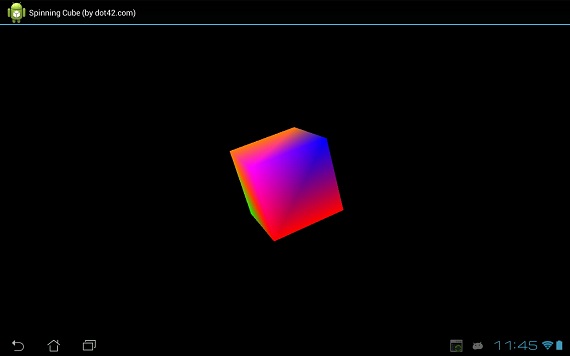
Spinning cube: an OpenGL code sample

This code sample demonstrates how to write an OpenGL application using dot42.


Download the Visual Studio 2010/2012 Professional project. Make sure you have dot42 installed.

About OpenGL

Android includes support for high performance 2D and 3D graphics with the Open Graphics Library (OpenGL), specifically, the OpenGL ES API. OpenGL is a cross-platform graphics API that specifies a standard software interface for 3D graphics processing hardware. OpenGL ES is a flavor of the OpenGL specification intended for embedded devices. Read more.

OpenGL and dot42

Since dot42 supports the entire Android framework API, OpenGL is fully at your disposal. Note that dot42 does NOT introduce a performance penalty. Your compiled code calls directly into OpenGL.

MainActivity

Here is the code for the main activity:

[Activity]
public class MainActivity : Activity
{
  protected override void OnCreate(
    Bundle savedInstance)
  {
    base.OnCreate(savedInstance);          
        
    GLSurfaceView glView = new GLSurfaceView(this);
    glView.SetRenderer(new MyRenderer());

    SetContentView(glView);
  }     
}

GLSurfaceView is a View where you can draw and manipulate objects using OpenGL API calls and is similar in function to a SurfaceView.

MyRenderer implements interface GLSurfaceView.IRenderer. This interface defines the methods required for drawing graphics in an OpenGL GLSurfaceView. MyRenderer is attached to the GLSurfaceView instance using GLSurfaceView.SetRenderer().

MyRenderer

Here is the code for MyRenderer:

public class MyRenderer : GLSurfaceView.IRenderer
{
  private Cube mCube = new Cube();
  private float mCubeRotation;

  public void OnSurfaceCreated(
    IGL10 gl, EGLConfig config)
  {
    gl.GlClearColor(0.0f, 0.0f, 0.0f, 0.5f);
    gl.GlClearDepthf(1.0f);
    gl.GlEnable(IGL10Constants.GL_DEPTH_TEST);
    gl.GlDepthFunc(IGL10Constants.GL_LEQUAL);

    gl.GlHint(
      IGL10Constants.GL_PERSPECTIVE_CORRECTION_HINT,
      IGL10Constants.GL_NICEST);
  }

  public void OnDrawFrame(IGL10 gl)
  {
    gl.GlClear(IGL10Constants.GL_COLOR_BUFFER_BIT |;
      IGL10Constants.GL_DEPTH_BUFFER_BIT);
    gl.GlLoadIdentity();

    gl.GlTranslatef(0.0f, 0.0f, -10.0f);
    gl.GlRotatef(mCubeRotation, 1.0f, 1.0f, 1.0f);

    mCube.Draw(gl);

    gl.GlLoadIdentity();
    mCubeRotation -= 0.7f;
  }

  public void OnSurfaceChanged(
    IGL10 gl, int width, int height)
  {
    gl.GlViewport(0, 0, width, height);
    gl.GlMatrixMode(IGL10Constants.GL_PROJECTION);
    gl.GlLoadIdentity();
    GLU.GluPerspective(
      gl, 45.0f, (float) width/(float) height, 
      0.1f, 100.0f);
    gl.GlViewport(0, 0, width, height);
    gl.GlMatrixMode(IGL10Constants.GL_MODELVIEW);
    gl.GlLoadIdentity();
  }
}

Much of this is boiler-plate code. The interesting method is OnDrawFrame. This method is responsible for drawing the current frame. The implementation is delegated to Cube which is discussed next.

Cube

Class Cube contains both the definition of the cube itself (geometry and colors) and the code to draw to the OpenGL surface. Here is the code:
internal class Cube
{
  private FloatBuffer mVertexBuffer;
  private FloatBuffer mColorBuffer;
  private ByteBuffer mIndexBuffer;

  // every 3 entries represent the 
  // position of one vertex
  private float[] vertices =
  {
    -1.0f, -1.0f, -1.0f, 
    1.0f, -1.0f, -1.0f, 
    1.0f, 1.0f, -1.0f, 
    -1.0f, 1.0f, -1.0f,
    -1.0f, -1.0f, 1.0f, 
    1.0f, -1.0f, 1.0f, 
    1.0f, 1.0f, 1.0f, 
    -1.0f, 1.0f, 1.0f
  };

  // every 4 entries represent the color (r,g,b,a) 
  // of the corresponding vertex in vertices
  private float[] colors =
  {
    0.0f, 1.0f, 0.0f, 1.0f, 
    0.0f, 1.0f, 0.0f, 1.0f, 
    1.0f, 0.5f, 0.0f, 1.0f, 
    1.0f, 0.5f, 0.0f, 1.0f, 
    1.0f, 0.0f, 0.0f, 1.0f, 
    1.0f, 0.0f, 0.0f, 1.0f,
    0.0f, 0.0f, 1.0f, 1.0f,
    1.0f, 0.0f, 1.0f, 1.0f
  };

  private byte[] indices =
  {
    0, 4, 5, 0, 5, 1, // two triangles for side 1
    1, 5, 6, 1, 6, 2, // two triangles for side 2
    2, 6, 7, 2, 7, 3, // etc.
    3, 7, 4, 3, 4, 0, 
    4, 7, 6, 4, 6, 5, 
    3, 0, 1, 3, 1, 2
  };

  public Cube()
  {
    ByteBuffer byteBuf = ByteBuffer.AllocateDirect(
      vertices.Length * 4);
    byteBuf.Order(ByteOrder.NativeOrder());
    mVertexBuffer = byteBuf.AsFloatBuffer();
    mVertexBuffer.Put(vertices);
    mVertexBuffer.Position(0);

    byteBuf = ByteBuffer.AllocateDirect(
      colors.Length * 4);
    byteBuf.Order(ByteOrder.NativeOrder());
    mColorBuffer = byteBuf.AsFloatBuffer();
    mColorBuffer.Put(colors);
    mColorBuffer.Position(0);

    mIndexBuffer = ByteBuffer.AllocateDirect(
      indices.Length);
    mIndexBuffer.Put(indices);
    mIndexBuffer.Position(0);
  }

  public void Draw(IGL10 gl)
  {
    gl.GlFrontFace(IGL10Constants.GL_CW);

    gl.GlVertexPointer(
      3, IGL10Constants.GL_FLOAT, 0, mVertexBuffer);
    gl.GlColorPointer(
      4, IGL10Constants.GL_FLOAT, 0, mColorBuffer);

    gl.GlEnableClientState(
      IGL10Constants.GL_VERTEX_ARRAY);
    gl.GlEnableClientState(
      IGL10Constants.GL_COLOR_ARRAY);

    // draw all 36 triangles
    gl.GlDrawElements(
      IGL10Constants.GL_TRIANGLES, 36, 
      IGL10Constants.GL_UNSIGNED_BYTE, mIndexBuffer);

    gl.GlDisableClientState(
      IGL10Constants.GL_VERTEX_ARRAY);
    gl.GlDisableClientState(
      IGL10Constants.GL_COLOR_ARRAY);
  }
}

Acknowledgement

Large part of the code was taken from http://intransitione.com/blog/create-a-spinning-cube-with-opengl-es-and-android/.