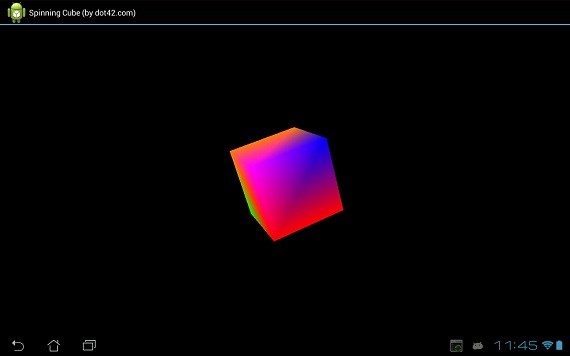
This code sample demonstrates how to write an OpenGL application using dot42.
Download the
Visual Studio 2010/2012 Professional project. Make sure you have
dot42 installed.
About OpenGL
Android includes support for high performance 2D and 3D graphics with the Open Graphics Library (OpenGL), specifically, the OpenGL ES API. OpenGL is a cross-platform graphics API that specifies a standard software interface for 3D graphics processing hardware. OpenGL ES is a flavor of the OpenGL specification intended for embedded devices.
Read more.
OpenGL and dot42
Since dot42 supports the entire Android framework API, OpenGL is fully at your disposal. Note that dot42 does NOT introduce a performance penalty. Your compiled code calls directly into OpenGL.
MainActivity
Here is the code for the main activity:
[Activity]
public class MainActivity : Activity
{
  protected override void OnCreate(
    Bundle savedInstance)
  {
    base.OnCreate(savedInstance);

    GLSurfaceView glView = new GLSurfaceView(this);
    glView.SetRenderer(new MyRenderer());

    SetContentView(glView);
  }
}
GLSurfaceView is a View where you can draw and manipulate objects using OpenGL API calls and is similar in function to a SurfaceView.
MyRenderer implements interface GLSurfaceView.IRenderer. This interface defines the methods required for drawing graphics in an OpenGL GLSurfaceView. MyRenderer is attached to the GLSurfaceView instance using GLSurfaceView.SetRenderer().
MyRenderer
Here is the code for MyRenderer:
public class MyRenderer : GLSurfaceView.IRenderer
{
  private Cube mCube = new Cube();
  private float mCubeRotation;

  public void OnSurfaceCreated(
    IGL10 gl, EGLConfig config)
  {
    gl.GlClearColor(0.0f, 0.0f, 0.0f, 0.5f);
    gl.GlClearDepthf(1.0f);
    gl.GlEnable(IGL10Constants.GL_DEPTH_TEST);
    gl.GlDepthFunc(IGL10Constants.GL_LEQUAL);

    gl.GlHint(
      IGL10Constants.GL_PERSPECTIVE_CORRECTION_HINT,
      IGL10Constants.GL_NICEST);
  }

  public void OnDrawFrame(IGL10 gl)
  {
    gl.GlClear(IGL10Constants.GL_COLOR_BUFFER_BIT |;
      IGL10Constants.GL_DEPTH_BUFFER_BIT);
    gl.GlLoadIdentity();

    gl.GlTranslatef(0.0f, 0.0f, -10.0f);
    gl.GlRotatef(mCubeRotation, 1.0f, 1.0f, 1.0f);

    mCube.Draw(gl);

    gl.GlLoadIdentity();
    mCubeRotation -= 0.7f;
  }

  public void OnSurfaceChanged(
    IGL10 gl, int width, int height)
  {
    gl.GlViewport(0, 0, width, height);
    gl.GlMatrixMode(IGL10Constants.GL_PROJECTION);
    gl.GlLoadIdentity();
    GLU.GluPerspective(
      gl, 45.0f, (float) width/(float) height,
      0.1f, 100.0f);
    gl.GlViewport(0, 0, width, height);
    gl.GlMatrixMode(IGL10Constants.GL_MODELVIEW);
    gl.GlLoadIdentity();
  }
}
Much of this is boiler-plate code. The interesting method is OnDrawFrame. This method is responsible for drawing the current frame. The implementation is delegated to Cube which is discussed next.
Cube
Class Cube contains both the definition of the cube itself (geometry and colors) and the code to draw to the OpenGL surface. Here is the code:
internal class Cube
{
  private FloatBuffer mVertexBuffer;
  private FloatBuffer mColorBuffer;
  private ByteBuffer mIndexBuffer;

  // every 3 entries represent the
  // position of one vertex
  private float[] vertices =
  {
    -1.0f, -1.0f, -1.0f,
    1.0f, -1.0f, -1.0f,
    1.0f, 1.0f, -1.0f,
    -1.0f, 1.0f, -1.0f,
    -1.0f, -1.0f, 1.0f,
    1.0f, -1.0f, 1.0f,
    1.0f, 1.0f, 1.0f,
    -1.0f, 1.0f, 1.0f
  };

  // every 4 entries represent the color (r,g,b,a)
  // of the corresponding vertex in vertices
  private float[] colors =
  {
    0.0f, 1.0f, 0.0f, 1.0f,
    0.0f, 1.0f, 0.0f, 1.0f,
    1.0f, 0.5f, 0.0f, 1.0f,
    1.0f, 0.5f, 0.0f, 1.0f,
    1.0f, 0.0f, 0.0f, 1.0f,
    1.0f, 0.0f, 0.0f, 1.0f,
    0.0f, 0.0f, 1.0f, 1.0f,
    1.0f, 0.0f, 1.0f, 1.0f
  };

  private byte[] indices =
  {
    0, 4, 5, 0, 5, 1, // two triangles for side 1
    1, 5, 6, 1, 6, 2, // two triangles for side 2
    2, 6, 7, 2, 7, 3, // etc.
    3, 7, 4, 3, 4, 0,
    4, 7, 6, 4, 6, 5,
    3, 0, 1, 3, 1, 2
  };

  public Cube()
  {
    ByteBuffer byteBuf = ByteBuffer.AllocateDirect(
      vertices.Length * 4);
    byteBuf.Order(ByteOrder.NativeOrder());
    mVertexBuffer = byteBuf.AsFloatBuffer();
    mVertexBuffer.Put(vertices);
    mVertexBuffer.Position(0);

    byteBuf = ByteBuffer.AllocateDirect(
      colors.Length * 4);
    byteBuf.Order(ByteOrder.NativeOrder());
    mColorBuffer = byteBuf.AsFloatBuffer();
    mColorBuffer.Put(colors);
    mColorBuffer.Position(0);

    mIndexBuffer = ByteBuffer.AllocateDirect(
      indices.Length);
    mIndexBuffer.Put(indices);
    mIndexBuffer.Position(0);
  }

  public void Draw(IGL10 gl)
  {
    gl.GlFrontFace(IGL10Constants.GL_CW);

    gl.GlVertexPointer(
      3, IGL10Constants.GL_FLOAT, 0, mVertexBuffer);
    gl.GlColorPointer(
      4, IGL10Constants.GL_FLOAT, 0, mColorBuffer);

    gl.GlEnableClientState(
      IGL10Constants.GL_VERTEX_ARRAY);
    gl.GlEnableClientState(
      IGL10Constants.GL_COLOR_ARRAY);

    // draw all 36 triangles
    gl.GlDrawElements(
      IGL10Constants.GL_TRIANGLES, 36,
      IGL10Constants.GL_UNSIGNED_BYTE, mIndexBuffer);

    gl.GlDisableClientState(
      IGL10Constants.GL_VERTEX_ARRAY);
    gl.GlDisableClientState(
      IGL10Constants.GL_COLOR_ARRAY);
  }
}
Acknowledgement
Large part of the code was taken from
http://intransitione.com/blog/create-a-spinning-cube-with-opengl-es-and-android/.